
Short answer: Gemini does not count your messages. It counts effort. A short question costs very little, but a long chat, a big PDF, Deep Research or an image or video costs a lot, so you can hit the limit after only a few prompts. The limit comes back every 5 hours, until you reach a bigger weekly limit. To see where you stand, open gemini.google.com, tap Settings at the bottom left, then Usage Limits.
People keep asking the same thing. One Reddit user with a paid plan hit the limit after about 20 to 25 image generations and got a reset time only 1 to 2 hours away. He had expected a fixed number like 100 a day. Google gives no such number, so the thread has no clear answer. This guide explains the real rule and how to make your allowance last.
Why Gemini says limit reached when you barely used it
Think of mobile data, not SMS packs. An SMS pack gives you 100 messages, and every message costs one. Mobile data is different: a text chat uses almost nothing, while one HD video can finish your daily quota. Gemini works like data. Google calls it a compute-based limit, and it looks at four things: how hard your prompt is, which model and feature you use, and how long the chat already is.
The long chat is the part most students miss. Every new reply makes Gemini read the whole earlier conversation again. So message number 60 in the same chat is much heavier than message number 1, even if you type only “ok, make it shorter”.
What costs a lot and what costs little
Google’s help page rates the usage cost of different work. I took the ratings from there and added my own Indian examples:
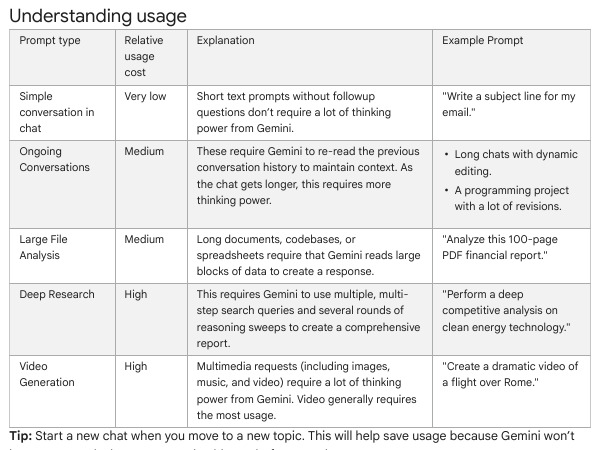
| What you do | Cost (Google) | Example from a student’s day |
|---|---|---|
| Short one-off question | Very low | Ask for a better subject line for a college leave email |
| Long chat with many edits | Medium | One chat for a whole week of B.Com notes, 80 messages deep |
| Big file analysis | Medium | Upload a 100-page balance sheet PDF and ask questions |
| Deep Research | High | Compare five mutual fund categories with sources |
| Images, music, video | High (video most) | Make a reel intro clip or repeated thumbnail attempts |
Why the Reddit user ran out fast
Image work is rated high. When you ask for ten small changes to one picture, each try costs a lot, and the chat also grows. So 20 to 25 images using up the allowance is believable, though Google does not publish an exact count.
The 5-hour limit and the weekly limit
There are two clocks. The 5-hour clock gives you a fresh allowance every 5 hours. The weekly clock is a ceiling above it. If you spend hard every 5 hours, you can use up the weekly amount before the week ends. Then waiting 5 hours does not help, because the week is the problem.
This is why people say “it was fine yesterday, but now it says wait.” Heavy use on Monday and Tuesday can leave less for Friday. I cannot see inside Google’s maths, and Google says limits can change without notice. So treat any number you read on a blog as a guess, including numbers on this site.
How to check your usage and reset time
- Open gemini.google.com in a browser and sign in to the account you use.
- At the bottom left, tap Settings.
- Choose Usage Limits.
- Read how close you are and when it refreshes.
Google says Gemini also warns you when you are close, and shows the refresh time once you reach the limit. If you only use the phone app and cannot find the screen, use the website once in your phone browser with desktop view. I checked the menu path on Google’s page; the layout can change.
How to stretch your allowance
1. Start a new chat for each topic
Google’s own tip is this. A fresh chat means Gemini has nothing old to re-read. Make it a habit: one chat for Accounting notes, another for the resume, another for Instagram captions. If you need the earlier facts, paste a 5-line summary into the new chat instead of keeping the old one open.
2. Ask for the final result, not ten small edits
Write one clear prompt with everything you want. Ten tiny follow-ups cost more than one good request, and they grow the chat too. Here is a template you can copy:
Task: [what you want]
Audience: [who will read it]
Length: [words or lines]
Format: [bullets, table, email]
Must include: [3 facts]
Avoid: [anything you do not want]
3. Save heavy features for when you need them
Deep Research and video are rated high. Use a normal chat for rough ideas, and keep the heavy tool for the final step. For images, write a detailed prompt once before you generate, so you do not burn tries on guesses.
4. Split big files
A large PDF is rated medium, so ask for what you need. If you only need chapter 3 of a long book, upload or paste only chapter 3.
5. Move heavy work to another time slot
Since the allowance refreshes every 5 hours, plan around it. If you have an exam week, do the heavy research early in the day and keep the evening for light questions.
Does a paid plan help?
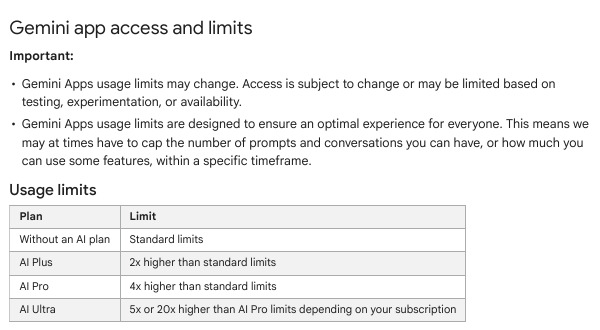
Yes, but it is not unlimited. Google lists AI Plus at 2x the standard limit, AI Pro at 4x, and AI Ultra at 5x or 20x of AI Pro depending on the subscription. The multiplier is applied to the same compute-based limit, so a heavy video user can still run out on a paid plan. That matches the Reddit story above.
Plans also change the reading capacity (context window): 32k tokens with no plan, 128k with AI Plus and 1 million with AI Pro or Ultra. A bigger window lets Gemini read more at once, but a long chat still costs more to process. If you hit the limit with a paid plan, Google says you can keep chatting with Flash-Lite. Check the price in your own account before upgrading, because I could not verify prices for India on this run.
| Plan | Usage limit | Context window |
|---|---|---|
| No AI plan | Standard | 32k tokens |
| AI Plus | 2x standard | 128k tokens |
| AI Pro | 4x standard | 1 million tokens |
| AI Ultra | 5x or 20x of AI Pro | 1 million tokens |
If it still says limit reached
- Check the account. Work and school accounts follow different rules than personal ones. If you use a college Google account, read Google’s page for work or school accounts.
- Check for a restriction, not a limit. A limit comes with a refresh time. A restriction on the account is a different problem. One help thread shows a user whose access was restricted and who could not finish the verification step. If you see a restriction message instead of a timer, use the appeal option shown there.
- Wait for the refresh time. If the screen shows a time, that is your answer. Do light work till then.
- Use another tool for the gap. Keep a second AI app for simple questions, so you are not stuck during the wait.
Common mistakes
- Keeping one chat for everything. It gets heavier with every reply.
- Retrying the same prompt again and again. Each retry costs usage. Change the prompt first.
- Thinking a paid plan means unlimited. It only raises the ceiling.
- Trusting fixed numbers from blogs or videos. Google says the limits can change without notice.
- Mixing up a limit and a restriction. They need different fixes.
- Using heavy features for simple tasks. Do not use Deep Research for a quick fact.
My view
The honest problem is that Gemini hides the maths. A counter like “12 of 40 left” would end most of these Reddit threads. Until then, the best habit is the cheapest one: short chats, one good prompt, and a look at the Usage Limits screen before a big job. I follow the same rule for my own work on this site.
FAQ
Is the Gemini limit per day?
No. Google describes a 5-hour refresh plus a weekly limit. There is no per-day number on the help page.
Why did I run out after only three prompts?
The prompts were probably heavy, such as images, a large file, or a very long chat. Cost depends on the work, not the count.
Does deleting the chat bring my usage back?
I found nothing on Google’s page saying it does. The limit refreshes on its own schedule, so I would not count on it.
Do free users get the same features as paid users?
Not all. Google’s table shows items like video generation and Redo with Nano Banana Pro only on paid plans, and says Deep Research may be unavailable for free users when demand is high.
Will these limits change?
Yes, Google says so on the page. Recheck the Usage Limits screen and the help page when something feels different.
Sources & Documentation
- Gemini Apps Help: Gemini Apps limits & feature availability
- Gemini Apps Help: Manage your Google AI plan from Gemini Apps
- Gemini Apps Help: Gemini Apps with a work or school account
- Reddit r/GeminiAI: Nano Banana Pro Limits
- Gemini Apps Community: Gemini access restricted
Written & Verified by Sampath Anji
Sampath Anji is a technology researcher, systems developer, and digital creator based in Telangana, India. He specializes in on-device AI architectures, autonomous agent workflows, high-throughput inference engines, and digital media production. Every tutorial on ISMARTANJI CREATIONS is grounded in code reproducibility, verified documentation, and transparent test environments. Read our full testing methodology on our About Us page, or submit feedback and code updates via our Contact Desk.