
Short answer: yes, his name can show. Since 1 November 2026, phone companies must show a caller’s name next to the number, and that name comes from the SIM paperwork. If your SIM was bought on your father’s ID, a person who has not saved your number may see your father’s name when you call. There is no setting to switch it off. You can fix it by asking people to save your number now, or by moving the SIM to your own name through your operator.
Many people across India are asking the same thing today: my SIM is not in my name, so whose name will people see? News reports say what happens, but few explain what to do next. I read the government order itself to answer it.
What Changed on 1 November, in Plain Words
The Department of Telecommunications (DoT) sent an order to all phone companies on 13 October 2026. From 1 November they must run a service called Calling Name Presentation, or CNAP. It starts on 4G and 5G networks. 2G, 3G and landlines will be looked at later. Nobody has to apply or install an app.
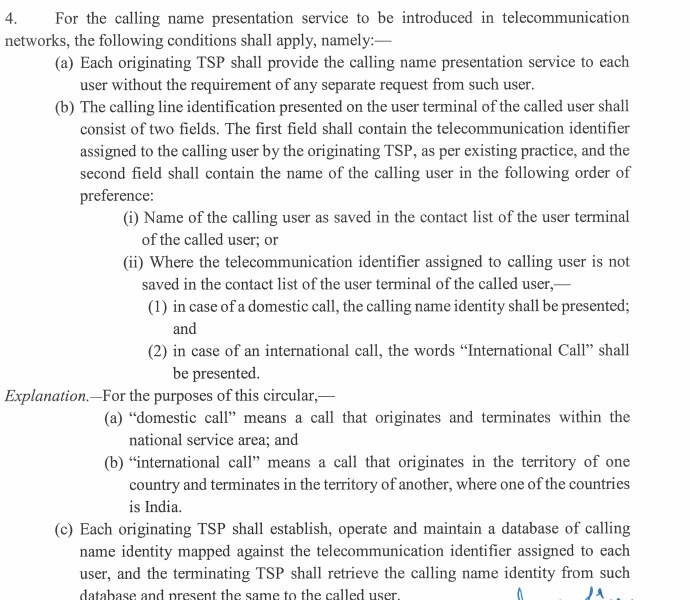
Your phone screen gets two lines for an incoming call: the number as before, and a name. Which name appears depends on who is calling and whether you saved them.
| Situation | What the person receiving the call sees |
|---|---|
| The caller’s number is saved in the receiver’s contacts | The name the receiver saved. The network name does not replace it |
| Unsaved Indian number, caller on 4G or 5G | The name on record with the caller’s operator |
| Unsaved number from another country | The words International Call, not a name |
| Caller has an approved CLIR facility | No name is shown |
| Business or bulk connection with an approved preferred name | The registered trade mark or GST trade name |
| Call made through WhatsApp or Telegram | Reported to be outside CNAP, because it is an internet call |
Why Your Father’s Name Shows and Not Yours
The name is read from the operator’s subscriber record. That record holds whatever name went on the paperwork when the SIM was activated. It is not read from your Aadhaar, your Google account, or the name you gave the phone.
This mismatch is very common in Indian homes. Think of a SIM bought in Class 11 on your father’s Aadhaar, or one your elder brother took for the whole family. Now picture your first call to a landlord, a college office or an internship HR person. They have not saved you, so they see Ramesh Kumar when you are Priya. The system is not wrong, but it looks odd, and a mismatch is exactly what makes people suspect a scam call.
Check what your record says first
Open your operator app (MyJio, Airtel Thanks or Vi) and look at the profile page. Many show the registered name. If not, ask at the store.
Can You Hide Your Name or Turn CNAP Off?
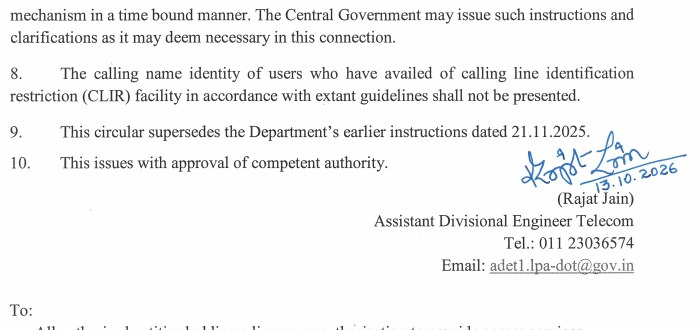
No. The circular says the service must be given to every user “without the requirement of any separate request”, and it does not offer an opt-out. The only people left out are users who have the Calling Line Identification Restriction (CLIR) facility, under paragraph 8.
Do not plan around CLIR. Reports say it has long been meant for a very small group, such as senior officials, and I found no sign that this changed for CNAP. If you need it, ask your operator and expect a no.
Fix 1: Tell Your Contacts to Save You (Takes Two Minutes)
The saved name always beats the network name. So the quickest fix is to make sure the people who matter have you saved. Send this to your landlord, your college group and anyone you will call soon. Edit the name first.
Hi, this is Priya Sharma. My SIM is registered in my father's name, so my number may show as Ramesh Kumar on your phone. Please save this number as Priya Sharma. Thank you!For job and internship forms, add one line in your email saying the SIM is registered with your father. A recruiter who reads it will not worry when the screen shows another name.
Fix 2: Move the SIM to Your Own Name
This is the real fix, and it takes more effort. Vi, Jio and Airtel all publish transfer paperwork, and Vi limits it to family.
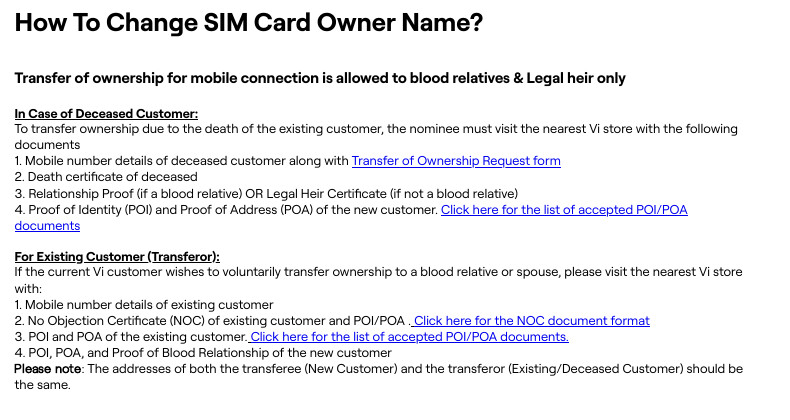
- Check you are eligible. Vi’s help page says a voluntary transfer is allowed to a blood relative or spouse, and a transfer after a death goes to a legal heir. A father to a son or daughter fits this.
- Get the current owner’s help. Your father needs to give a No Objection Certificate (NOC) in the operator’s format. The Hindu reports that, depending on the company, the adult family member may need to help start and finish the process.
- Collect the papers. Vi lists ID and address proof for both people, and proof of the family relationship. It also says both addresses should be the same. Jio and Airtel both publish their own NOC forms, and their paperwork can differ from Vi’s.
- Go to the store of the same operator. A general mobile shop may not be able to do this. Ask for the transfer of ownership form and say clearly that you want the name changed.
- Ask two questions before you hand over anything. Will my number stay the same? Will a new SIM be issued? Airtel’s own form says the transfer is handled like a new connection and mentions a charge of Rs 25 if a SIM exchange is needed. Keep your old SIM working until they confirm.
- Check the result. After a few days, look at your app profile again, then ask a friend who has not saved you to call you.
What If the Store Says ‘There Is No Policy’?
This happens. Indian forum users say some Airtel and Jio stores turned them away. A few said they got the name changed by porting to another operator with the new owner’s documents. I could not verify porting as an official route, so I will not push it as the first step.
A better order is this: ask for the manager, show the operator’s own form or help page, and ask for a written complaint number. Paragraph 7 of the circular tells every operator to keep a system to receive and solve CNAP complaints in a fixed time. Quote that paragraph if you are refused.
Never fix this with someone else’s ID
Do not take a SIM or port a number using a friend’s, neighbour’s or shop owner’s documents. The name in the record is the name every call from that number carries, and a wrong one can cause trouble later. If you want to see how many SIMs are on your own ID, read our TAFCOP guide.
The Name Is Wrong or Spelled Badly
Business Standard points out that old names and wrong spellings in the record will show up on screen too. If the SIM is already yours but the spelling is wrong, ask the store to correct the record, and carry the original ID with the right spelling.
Not Seeing Any Name on Incoming Calls?
- The number is already saved in your contacts. The saved name wins.
- The call is from abroad. You will only see International Call.
- The caller may be using CLIR, or may be on a 2G, 3G or landline connection that is not covered yet.
- Your phone is on a 2G or 3G network at that moment.
- It is day one. I cannot confirm every operator has switched on every city.
- No official list of supported phones exists, so do not assume your model shows the field.
To test, ask a friend you have not saved to call you, then check your network mode. Menus move between versions, so use the Settings search box if yours differ.
| Phone | Where to check 4G or 5G |
|---|---|
| Samsung | Settings, Connections, Mobile networks, Network mode |
| Pixel | Settings, Network & internet, SIMs, choose your SIM, Preferred network type |
| Xiaomi, Redmi, Poco | Settings, SIM cards & mobile networks, choose your SIM, Preferred network type |
| Others | Search Settings for Network mode |
CNAP or Truecaller: Do You Still Need the App?
CNAP shows the registered SIM owner. Truecaller uses its own data and adds labels like spam. Truecaller told Business Today that CNAP will not replace it, because a name does not tell you if a caller is a scammer. If spam alerts are why you installed the app, keep it.
A name on screen is not proof
The name is the SIM owner, not the person speaking, and fraud callers can use SIMs in other people’s names or spoofed numbers. If a caller claims to be your bank or the police, hang up and call the official number. If you lose money, follow our 1930 reporting guide without delay.
Common Mistakes
- Searching phone settings for a CNAP switch. It runs in the network, so there is none.
- Assuming your Aadhaar or Google name is used. Only the operator record counts.
- Going to a local mobile shop instead of the operator’s own store.
- Trusting a call because the name looks official.
Frequently Asked Questions
Can I set a nickname or my college name to show?
No. A preferred name is only for business or bulk connections, and it must match a registered trade mark or a name on the GST portal. A student cannot use it.
Will WhatsApp calls show my SIM owner’s name?
Reports say no, because those are internet calls and do not use the phone network’s caller line. What a WhatsApp call shows is your WhatsApp profile and number.
Is this the same as SIM binding?
No. CNAP shows a name on calls. SIM binding ties messaging apps to your active SIM. Our SIM binding explainer covers that.
Sources & Documentation
- Department of Telecommunications: Circular 01/Licensing Policy/2026 on calling name presentation (13 Oct 2026)
- Vi: How to change SIM card owner name
- Jio: No Objection Certificate for transfer of connection to a blood relative
- Airtel: Transfer of ownership declaration and NOC form
- Business Standard: CNAP explained, limits and wrong names
- The Hindu: Telecom operators to show KYC name of incoming callers
- Business Today: Truecaller says CNAP will not replace its caller ID
Checked on 1 November 2026, the first day of the rollout. Rules, forms and store practice can change, so confirm with your operator.
Written & Verified by Sampath Anji
Sampath Anji is a technology researcher, systems developer, and digital creator based in Telangana, India. He specializes in on-device AI architectures, autonomous agent workflows, high-throughput inference engines, and digital media production. Every tutorial on ISMARTANJI CREATIONS is grounded in code reproducibility, verified documentation, and transparent test environments. Read our full testing methodology on our About Us page, or submit feedback and code updates via our Contact Desk.