
Short answer: on 5 November 2026 the RBI issued a rulebook for non-bank payment companies, and it says that after you change the mobile number or email linked to a payment instrument, online payments must wait at least 12 hours. It also tells payment apps to stop working while a remote-access app is running on your phone. So if your payment fails right after a SIM or number change, the wait is probably the cause. The fix is mostly patience, plus a few checks.
People are confused because the rule is new, the error messages are not. Threads like this one on r/UPI and this old one on TechnoFino show users getting a vague ‘mobile number changed’ error, and replies mostly say ‘contact your bank’. This guide separates what the RBI text actually says from what apps may do on top of it.
What the RBI rule actually says
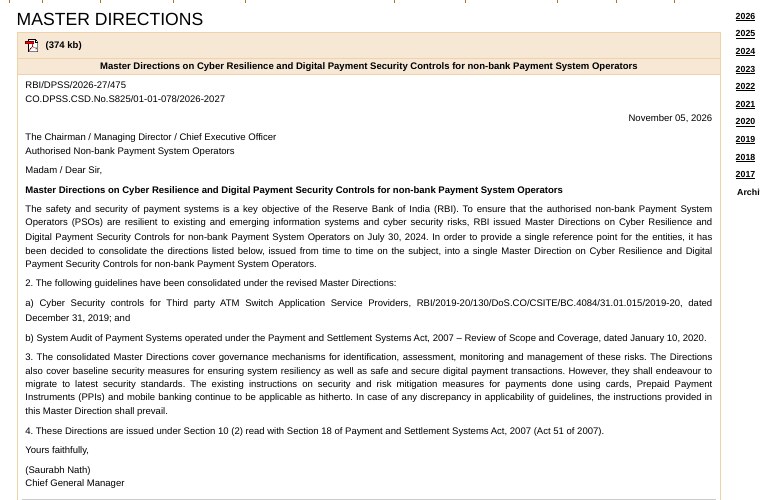
I read the RBI document itself. The line is short: whenever the registered mobile number or email ID linked to the payment instrument changes, there must be a cooling period of at least 12 hours before any payment through online modes or channels. The word ‘minimum’ matters. A company may hold payments for longer than 12 hours, but not shorter.
The same section has other rules that touch ordinary users. Apps must try to detect remote-access apps and block the payment app while that access is live. Apps must tie themselves to your phone and SIM, and repeat that binding if the app stays unused for a set period. Apps must also let you mark a transaction as fraud, and must tell you straight away about failed login attempts.
Who must follow it, and who may not
This is the part most blogs skip. The direction is addressed to authorised non-bank payment system operators. That group includes NPCI, card networks, payment aggregators and prepaid wallet companies. Large and medium companies had to follow it from the day it was published. Small ones have until 1 April 2028.
A bank’s own app is a bank, not a non-bank operator, so this specific document is not written for it. Banks are covered by other RBI rules, so what a bank-run app does may differ. I could not find an RBI line that says exactly how a UPI app must show this wait on screen, so treat the app’s message as the app’s own wording.
| Situation | Likely cause | What to do |
|---|---|---|
| Payment fails within a day of changing number or email | 12-hour cooling period | Wait, then retry on the same phone |
| Fails after 24 hours, number unchanged | Bank and app records do not match | Check the number at the bank, then re-link the account |
| Fails while a screen-share app is open | Remote access block | Close the app, restart the phone, retry |
| Message says suspicious activity | App found an unknown app with accessibility access | Remove that app, then change UPI PIN |
| App asks you to verify again | Device binding repeated after long gap | Let it send the SMS from the same SIM |
Why does RBI want a wait at all?
Think of a fraud case. A cheat gets your SIM swapped, or changes the email on your wallet, and tries to empty it within minutes. A fixed wait gives the real owner time to notice the SMS or call from the bank. A student with a Rs 3,000 stipend in a wallet may find 12 hours annoying. A person who just lost Rs 30,000 will find it very welcome.
The same thought is behind the remote-access rule. Many Indian frauds start with a caller who says ‘install this app so I can help you’. Once the app shares your screen, the cheat watches you type the UPI PIN. Blocking payments while such an app is live cuts the scam at its weakest point.
What to do if your payment is blocked after a number change
- Note the time you changed the number or email, not the time you noticed the problem. The 12 hours count from the change.
- Do not keep tapping Pay. Repeated failed tries can add a separate temporary lock in some apps, and they make the log confusing if you later raise a complaint.
- Keep the SIM with the new number in the same phone and keep mobile data on. Apps tie themselves to the phone and SIM.
- Open the app after 12 hours, preferably after 24 if you changed both number and email. Try a Rs 1 payment to a friend before a bill payment.
- If asked, let the app verify by SMS. Do not switch SIM slots in the middle.
Plan around it
Never change your bank number a few hours before rent, exam fee or EMI is due. Change it at least two days early, and keep a little cash for those two days.
If the wait is over and it still fails
Check the number the bank holds
Many failures I see in user threads have nothing to do with the new rule. The bank still holds the old number, or two customer IDs share one number, so the app cannot match you. Open your bank’s net banking or app, find the profile section, and compare the number there with the SIM in your phone. If they differ, update it with the bank first and then re-link the account in the UPI app.
Remove and add the account again
In your UPI app, open the bank account list, remove the account, and add it again. You will need the debit card’s last six digits and expiry for a fresh UPI PIN. One user on TechnoFino got a RuPay credit card working after adding the card again and resetting its PIN, though that thread is from 2023, so the screens may look different now.
Look for apps with accessibility or screen-share access
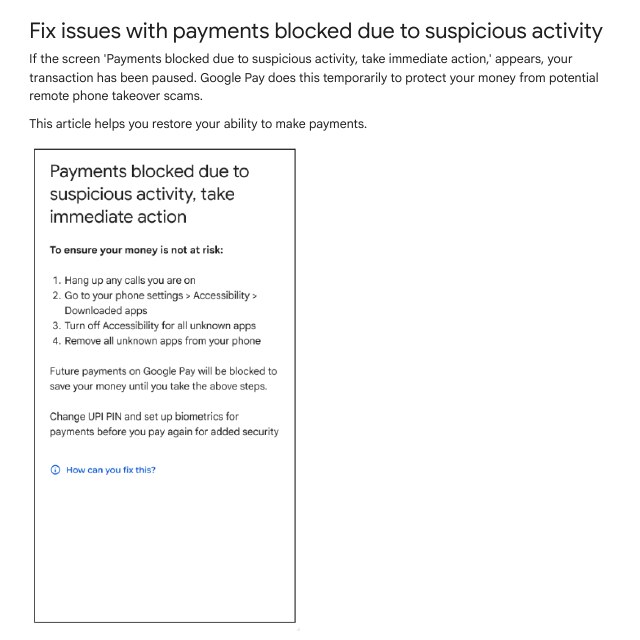
Google Pay’s own help page says its payment block appears when it finds an unknown app with accessibility permission switched on. On most Android phones the path is Settings, then Accessibility, then Downloaded apps or Installed services. Brands move this menu around, so on Samsung, Xiaomi or Realme phones type Accessibility in the Settings search box and open it from there. Switch off anything you do not know, and uninstall it.
Close screen-share apps properly
A screen-share app that is only minimised may still count as live. Open the recent apps list, swipe it away, and also stop any floating bubble or notification it leaves. Restart the phone if you are not sure. Then open the payment app again.
What to tell your bank or app support
If nothing works after a full day, write to support with facts. Support teams answer faster when the time of the change and the error are clear. Here is a message you can adapt.
Subject: UPI payments failing after mobile number change

Hello,

I changed my registered mobile number on [date] at [time].
Since then, UPI payments from my account ending [last 4 digits]
fail with the message: [exact message].

The new number is active in this phone. It is also updated in
my bank profile. More than 24 hours have passed.

Please check whether any hold is active on my account or my
UPI registration, and tell me when it will be removed.

Name: [your name]
Registered mobile: [number]
Keep screenshots of the error. If the bank does not reply within the time it promised, you can use the RBI complaint route later, but start with the bank.
Will this affect people who never change their number?
Mostly no. The most visible effect for a normal user is on the day you change a number or email. A smaller effect is device binding: if you leave an app unused for a long time, it may ask you to verify the SIM again. This is normal. Do it with the SIM that is registered with your bank, in the phone you actually use.
The remote-access rule can affect people who use screen-share tools for work. A college student who joins an online class and shares the screen may find the payment app refusing to open while sharing. The RBI text says apps must do this ‘to the extent possible’, so not every app will catch every tool. Stop sharing before paying and you will not notice it.
My view on the 12-hour rule
I think it is a good rule with weak communication. Twelve hours is short enough for most people to wait and long enough to spoil a quick fraud. What is missing is a clear on-screen message that says ‘wait, this is the rule’ with a time. Until apps do that, you will keep seeing vague errors, and users will keep blaming the bank or the SIM company.
My advice: treat a number or email change as a small event that needs planning. Tell the bank first, change the number in the UPI app after that, and avoid big payments for a day.
Common mistakes
- Changing the number on payday or due date. The wait will land at the worst moment.
- Retrying again and again. It does not shorten the wait and can add confusion.
- Using a different SIM slot or a second phone. Apps tie themselves to the SIM and phone.
- Updating the app but not the bank. The bank record is what the UPI system matches.
- Leaving a screen-share app open. The payment app may stay blocked.
- Believing every blog on this. Read the RBI text for the rule and the app’s own help page for how it works.
FAQ
Is the 12-hour wait the same for every app?
The RBI sets 12 hours as the minimum for non-bank payment companies. An app may set a longer hold. Banks follow their own rules, so the wait can differ.
Does it apply if I change only my email?
Yes. The RBI line covers a change in the registered mobile number or the email ID linked to the payment instrument.
Can I still receive money during the wait?
The RBI line speaks of payment transactions through online modes. It does not say what happens to money coming in, and I could not verify how each app treats it. Test with a small amount.
Do offline or card-swipe payments also stop?
The rule names online modes and channels. It does not say anything on swipe payments at a shop terminal, so I will not claim either way.
Is a payment block always because of this rule?
No. Mismatched numbers, a changed SIM, a screen-share app or an unknown accessibility app can all block a payment. Use the table above to find your case.
Sources & Documentation
- Reserve Bank of India: Master Directions on Cyber Resilience and Digital Payment Security Controls for non-bank Payment System Operators, 5 November 2026
- Google Pay Help: Fix issues with payments blocked due to suspicious activity
- MediaNama: What RBI’s consolidated cyber security rules mean for payment apps and users
- r/UPI: UPI payment keeps failing with ‘mobile number changed’ (user question)
Written & Verified by Sampath Anji
Sampath Anji is a technology researcher, systems developer, and digital creator based in Telangana, India. He specializes in on-device AI architectures, autonomous agent workflows, high-throughput inference engines, and digital media production. Every tutorial on ISMARTANJI CREATIONS is grounded in code reproducibility, verified documentation, and transparent test environments. Read our full testing methodology on our About Us page, or submit feedback and code updates via our Contact Desk.