
Short answer: "The OAuth client was not found, Error 401: invalid_client" means Google does not recognise the Client ID that your n8n credential sent. It is almost never a problem with your Gmail account or with n8n itself. The fix is to open Google Cloud, copy the Client ID of a Web application client from the same project where you enabled the Sheets API, and paste it into a fresh n8n credential. Then check the redirect URL and the test user list.
Beginners keep posting this on forums, like this n8n community thread where a learner was stuck for two days. The replies are long and mix three different errors together. Here I separate them, so you can tell which one you have in two minutes.
Which Google error are you actually seeing?
Google shows different words for different problems. People fix the wrong thing because they treat all of them as "OAuth not working". Match the message first.
| What the screen says | What it means | Where the fix is |
|---|---|---|
| invalid_client / OAuth client was not found | Google does not know the Client ID that was sent (typo, wrong project, swapped fields) | Credentials page in Google Cloud, then the n8n credential |
| redirect_uri_mismatch | The callback address n8n sent is not on the client’s allowed list | Authorized redirect URIs on the client |
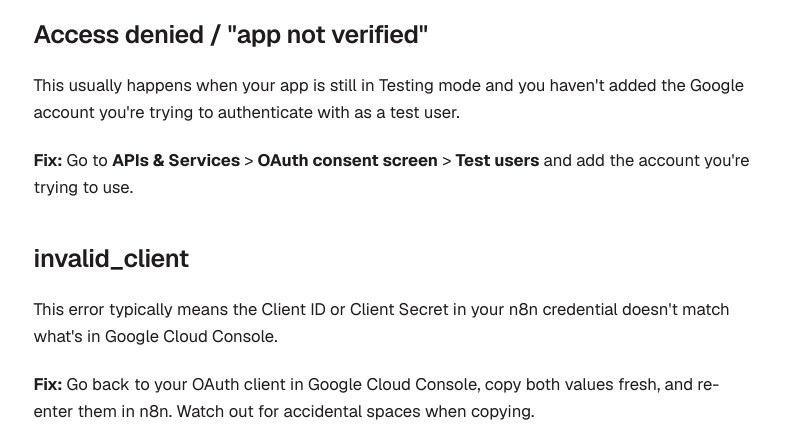
| Access blocked / access denied / app not verified | App is in Testing mode and your Gmail is not a test user | Audience page, Test users |
| Works for a week, then stops | Testing mode tokens expire after seven days | Reconnect, or publish the app |
Why does invalid_client happen on a home setup?
When you press Sign in with Google in n8n, your browser goes to Google carrying the Client ID. Google looks that ID up. If it finds no client, you get this screen. So the question is simply: what ID did n8n send, and does that ID exist?
On Indian student laptops running n8n in Docker, I see the same four causes again and again:
- The Client ID and Client Secret boxes are swapped, or a space came along when you copied.
- The client was made in one Google Cloud project but the Sheets API was enabled in another. You have two projects and are looking at the wrong one.
- The client was created as a different type, such as Desktop app, instead of Web application.
- The client is brand new. Forum helpers say new clients can take from a few minutes to a few hours to start working, so a fresh one sometimes fails on the first try.
Quick check you can do in 20 seconds
A real Client ID ends with .apps.googleusercontent.com. The Client Secret starts with GOCSPX-. If your Client ID box holds the GOCSPX text, that is your whole problem.
The fix, step by step
Do these in order. Do not skip step 1: a clean credential saves you from chasing old values.
- Open Google Cloud Console and look at the project name at the top. Use the project dropdown to choose the one where you want to work, and keep it the same for all steps.
- Go to APIs & Services, Library. Enable Google Sheets API and also Google Drive API. n8n’s own page says the Sheets, Docs and Slides nodes need the Drive API too.
- Open APIs & Services, Credentials (or the Clients page of Google Auth Platform). Check that an OAuth client ID of type Web application exists. If not, choose Create credentials, OAuth client ID, Web application.
- In n8n, open Credentials, Create credential, Google Sheets OAuth2 API. Copy the OAuth Redirect URL shown there.
- Back in Google, paste that URL into Authorized redirect URIs of your Web application client. Save.
- Copy the Client ID into n8n’s Client ID field, and the Client Secret into the Client Secret field. Delete any space at the end.
- Click Sign in with Google, choose your account, and allow access. Save the credential.
A local Docker install usually shows a redirect URL like the one below. n8n’s docs say Google accepts localhost for development, so you do not need a domain or an SSL certificate.
http://localhost:5678/rest/oauth2-credential/callbackThe point of step 4 is that n8n tells you the exact address it will send. You are not guessing. If you open n8n at 127.0.0.1 sometimes and localhost other times, treat them as different addresses and use the one your browser really shows.
Lost the Client Secret? Do this
Google’s developer page says the secret is shown only once, right after the client is created, and you cannot view it again. Many learners lose it and then wonder why n8n rejects the credential. Do not hunt for it. Open the client in Google Cloud, add a new secret (or create a new client), and put the new values in a new n8n credential.
Make a new credential rather than editing the old one. If the secret changed on one side only, an edited credential can keep old values and you will see the same error again.
Fix the other two errors before they bite you
redirect_uri_mismatch
Google’s page says the redirect address must match exactly: http versus https, upper and lower case, and a trailing slash all count. Also remember that plain http is only allowed for localhost. If you later move n8n to a VPS, you need https and a real domain, and you must add the new redirect URL.
Access denied while in Testing mode
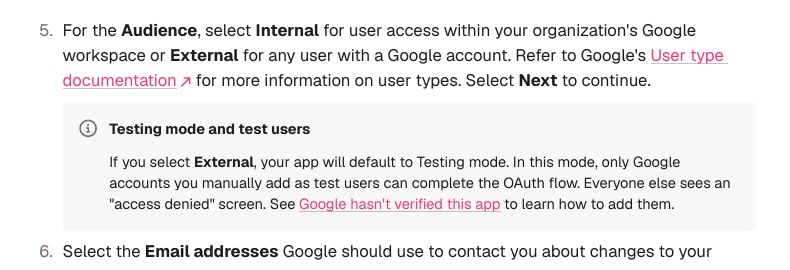
If you chose External for the audience, n8n’s docs say the app starts in Testing mode, and only Google accounts you added as test users can finish sign-in. Open Audience in Google Auth Platform and add the Gmail address you will sign in with.
Why does it stop working after a week?
n8n’s page also says that for External apps in Testing, consent and tokens expire after seven days, and the cure is to reconnect in the credential window. This is why a workflow that ran fine on Monday fails next Monday with no change from you.
You have two choices. Either reconnect weekly (fine for practice), or move the consent screen to production. One forum user who runs a personal instance reported doing exactly that; they said you then see an "unverified app" warning once and can continue. Treat that as one user’s report and read Google’s rules before using it for anything with other people’s data.
Which choice is better for a student?
| Option | Good for | Catch |
|---|---|---|
| Stay in Testing and reconnect each week | Learning and practice | You must remember to reconnect |
| Use a service account | Server tasks on your own sheet | Share the sheet with the service account email |
| n8n Cloud managed sign-in | No Google Cloud setup at all | Cloud only, and not every Google node |
| Publish the consent screen | Personal automations that run for months | Unverified warning, read Google’s rules |
n8n’s docs say Managed OAuth2 is for Cloud users and is not available when you self-host. So if you run Docker at home, you need your own client.
If it still fails
- Open the Google error in the browser address bar and look for
client_id=. Compare it letter by letter with your Google Cloud client. - Check the project number: the digits before the first dash in the Client ID belong to a project. They must match the project you have open.
- Create a brand-new Web application client with a different name, and use only that one.
- Try a private browser window, so a second Google account in your browser does not interfere.
- Wait an hour if the client is new, then try once more.
# n8n in Docker: check the container is up and see its recent log
docker ps --filter name=n8n
docker logs --tail 50 n8n
The log will show the callback request when sign-in comes back to n8n. If nothing appears, the failure happened earlier, at Google, which points to the Client ID.
Common mistakes
- Pasting the secret into the Client ID box. The two look alike and the error is the same.
- Enabling the Sheets API but not the Drive API. Later steps fail even if sign-in works.
- Choosing Desktop app as the client type. n8n needs Web application.
- Editing an old credential after rotating the secret. Make a new one.
- Using a copied Redirect URL from a tutorial. Always copy from your own n8n screen.
- Paying a stranger on a forum for a $10 fix. This job needs no access to your account, and you can do it yourself in ten minutes.
FAQ
Is this error caused by my Gmail account?
No. It is about the Client ID that n8n sends. A personal Gmail works fine once the client and test user are set up.
Do I need a domain to use Google Sheets in local n8n?
No. n8n’s docs say a localhost redirect works for development, with no domain, SSL or port forwarding.
What is the difference between invalid_client and deleted_client?
Google’s developer page lists deleted_client as a separate error for a client that was removed. Not found or invalid_client points to a wrong or unknown ID or secret.
Can I view my Client Secret again?
Google’s page says no. Add a new secret or create a new client and update n8n.
Why did it work last week and fail today?
If the app is External and in Testing mode, tokens expire after seven days. Reconnect the credential.
Sources & Documentation
- n8n Docs: Google OAuth2 single service (setup, Testing mode, troubleshooting)
- Google for Developers: OAuth 2.0 for web server applications (error codes, redirect URI rules, client secret)
- Google Cloud Console: OAuth clients page
- n8n Community: Google Sheets OAuth error invalid_client (user report, not official)
Written & Verified by Sampath Anji
Sampath Anji is a technology researcher, systems developer, and digital creator based in Telangana, India. He specializes in on-device AI architectures, autonomous agent workflows, high-throughput inference engines, and digital media production. Every tutorial on ISMARTANJI CREATIONS is grounded in code reproducibility, verified documentation, and transparent test environments. Read our full testing methodology on our About Us page, or submit feedback and code updates via our Contact Desk.