

Discover Modern AI Coding Assistants: Architecture, Context Windows, and Developer Workflows. Master agentic codebase editing, terminal execution, bug fixing, and multi-file workflows.
Modern AI Coding Assistants: Architecture, Context Windows, and Developer Workflows
Writing software in 2026 looks nothing like the single-line autocomplete snippets of a few years ago. Tab-completing a predictable for-loop or generating boilerplate getters and setters barely scratches the surface of modern software engineering. When applications span distributed microservices, intricate SQL schemas, and asynchronous event queues, developers need tools that understand the entire repository, reason across multiple files, and execute terminal commands autonomously.
The rise of AI coding assistants 2026 marks a major transition from passive text prediction to active agentic execution. Today’s top coding tools index complete codebases into semantic vector graphs, read project documentation, run unit test suites in background subshells, and automatically iterate on compiler errors until every check passes.
1. How Modern AI Coding Assistants Work: Indexing, Agents, and Tool Execution
Early AI coding tools treated code as plain text tokens. Modern coding assistants treat codebases as dynamic, interconnected abstract syntax trees (ASTs) backed by live execution environments.
Instead of passing only the currently open file to a language model, an agentic coding assistant orchestrates a continuous feedback loop:
- Codebase Indexing: Merkle Trees, AST Parsing & Vector Search
- Context Retrieval: Pinpoints Exact Functions, Types & Schemas
- Multi-File Plan: LLM Generates Structured File Diffs
- Tool Execution: Edits Files & Runs Build / Test Commands
- Compiler Error Parsing: Autonomous Self-Correction Loop
- Verified Output: Clean Working Code with Passing Tests
Three core technical mechanics power this generation of developer tools:
- Semantic Codebase Indexing: The assistant builds a local semantic index using tree-sitter parsers and embeddings. When you ask to “Add Stripe webhooks for failed subscription renewals,” it identifies your billing routes, database models, and user table schemas without manual file tagging.
- Autonomous Tool Loops: The model has direct access to read files, create new directories, execute package installs (npm install, cargo add), and trigger test runners (pytest, vitest). If a test fails, the agent reads the stack trace, adjusts the implementation, and re-runs the test automatically.
- Multi-File Diff Engine: Instead of regenerating whole files, modern assistants generate surgical diffs across five to twenty files simultaneously, preserving your existing formatting, imports, and comments.
2. Legacy Autocomplete Tools vs. Modern Agentic Coding Assistants
The leap from early inline suggestion engines to full agentic assistants represents a fundamental change in developer ergonomics:
| Engineering Capability | Legacy Autocomplete Tools (2022–2024) | Modern Agentic Coding Assistants (2026) | Developer Impact |
| Context Scope | Active file or recent cursor position | Full-repo AST index and cross-file dependencies | Zero context blindspots |
| Execution Model | Passive inline suggestions | Active multi-step tool and terminal execution | Automates entire workflows |
| Multi-File Edits | One file at a time; manual copy-pasting | Atomic multi-file diff generation | Complete feature builds |
| Error Handling | Ignores compiler and test output | Reads terminal logs and self-corrects bugs | Hands-free debugging |
| Terminal Integration | None | Runs shell commands with safety sandboxing | Full development lifecycle |
| Custom Rules | Static markdown prompts | Dynamic .cursorrules / .windsurfrules configs | Enforces team style guides |
3. Top 7 AI Coding Assistants for Developers in 2026
Here are the top seven coding assistants and agentic editors leading the software development industry in 2026.
1. Cursor (Anysphere) – The Industry Standard Agentic IDE
Cursor remains the gold standard for AI-first software development. Forked directly from VS Code, Cursor preserves your extensions, keybindings, and themes while embedding deep agentic intelligence across every panel. Its Composer feature plans and executes complex multi-file refactoring tasks across entire repositories.
- Best For: Full-stack developers, startup founders, and engineering teams wanting a polished, all-in-one agentic code editor.
- Standout Capabilities:
- Composer Multi-File Mode: Directs an autonomous agent to build complete features across frontend, backend, and database layers in one shot.
- Cursor Tab (Copilot++): Predicts your next multi-line edit and cursor jump based on recent coding patterns.
- Semantic Codebase Indexing: Continuously indexes your Git branches, making @Codebase queries instantaneous.
- Project Rule Files (.cursorrules): Guides model behavior with custom architecture conventions and API standards.
- Practical Workflow: Open Composer (Cmd+I), describe your feature, review the proposed multi-file diffs in parallel, and accept changes with a single shortcut.
- Pricing: Free tier available; Pro plan at $20/month with unlimited fast model requests.
2. Windsurf (Codeium) – Real-Time AI Flow State with Cascade
Built by the Codeium team, Windsurf introduces the concept of “AI Flow”—a collaborative paradigm where the developer and the AI assistant work in synchronized harmony. Its flagship agent, Cascade, continuously observes your terminal outputs, file modifications, and cursor movements to assist proactively without getting in your way.
- Best For: Developers who want deep real-time awareness and collaborative agentic coding without switching modes.
- Standout Capabilities:
- Cascade Agentic Engine: Combines conversational chat with deep codebase actions, running diagnostics and editing files in real time.
- Supercomplete System: Anticipates your next logical action, offering predictive completions before you type.
- Multi-File Awareness: Maintains active context across all open tabs, recently modified files, and terminal logs.
- Enterprise Security Guardrails: On-premise and air-gapped deployment options with strict zero-data-retention policies.
- Practical Workflow: Type your goal into Cascade, watch it inspect your imports and schema definitions, approve file edits, and let Cascade run your build script.
- Pricing: Free tier with generous usage; Pro plan at $15/month; Enterprise custom pricing.
3. Claude Code (Anthropic) – The Autonomous Terminal-Native Assistant
Claude Code is Anthropic’s command-line agentic tool designed to live directly inside your terminal. It gives Claude the ability to search codebases, edit files, run bash commands, and manage Git branches right from your shell prompt.
- Best For: Command-line power users, backend engineers, DevOps specialists, and developers managing large legacy code repositories.
- Standout Capabilities:
- Pure Terminal Workflow: Launches instantly inside any directory via claude with zero GUI bloat.
- Intelligent File Search: Employs regex, ripgrep, and AST pattern matching to explore massive codebases quickly.
- Automated Git Workflows: Reads commit histories, creates descriptive branch names, and writes well-structured pull request summaries.
- Self-Healing Test Cycles: Executes test commands, catches assertion errors, and refactors broken logic until all tests pass.
- Practical Workflow: Run claude in your terminal, type “Fix the flaky Redis cache timeout in the auth service,” and review the agent’s automated git diff before committing.
- Pricing: Pay-as-you-go billing based on Anthropic API token consumption (Claude 3.7 Sonnet / Opus).
4. Cline (formerly Claude Dev) – Open-Source Autonomous VS Code Extension
Cline is an open-source autonomous coding agent that runs directly inside official Microsoft VS Code. It uses advanced tool-calling protocols to create files, execute shell commands, and read browser logs with explicit user permission at every step.
- Best For: Developers who want complete model freedom (OpenAI, Anthropic, Gemini, DeepSeek, or local Ollama) inside standard VS Code.
- Standout Capabilities:
- BYOK (Bring Your Own Key): Connect any API provider or local inference endpoint with zero platform lock-in.
- Step-by-Step Human Verification: Prompts for one-click approval before running terminal commands or modifying disk files.
- Integrated Browser Testing: Launches automated browser sessions to test web UI rendering and inspect console errors.
- Context Window Optimization: Prunes long conversational context dynamically to prevent token exhaustion.
- Practical Workflow: Install Cline from the VS Code Marketplace, add your preferred API key, and instruct it to build a full-stack CRUD API from scratch.
- Pricing: 100% Free and Open Source (Apache 2.0 license); users pay only their own LLM API costs.
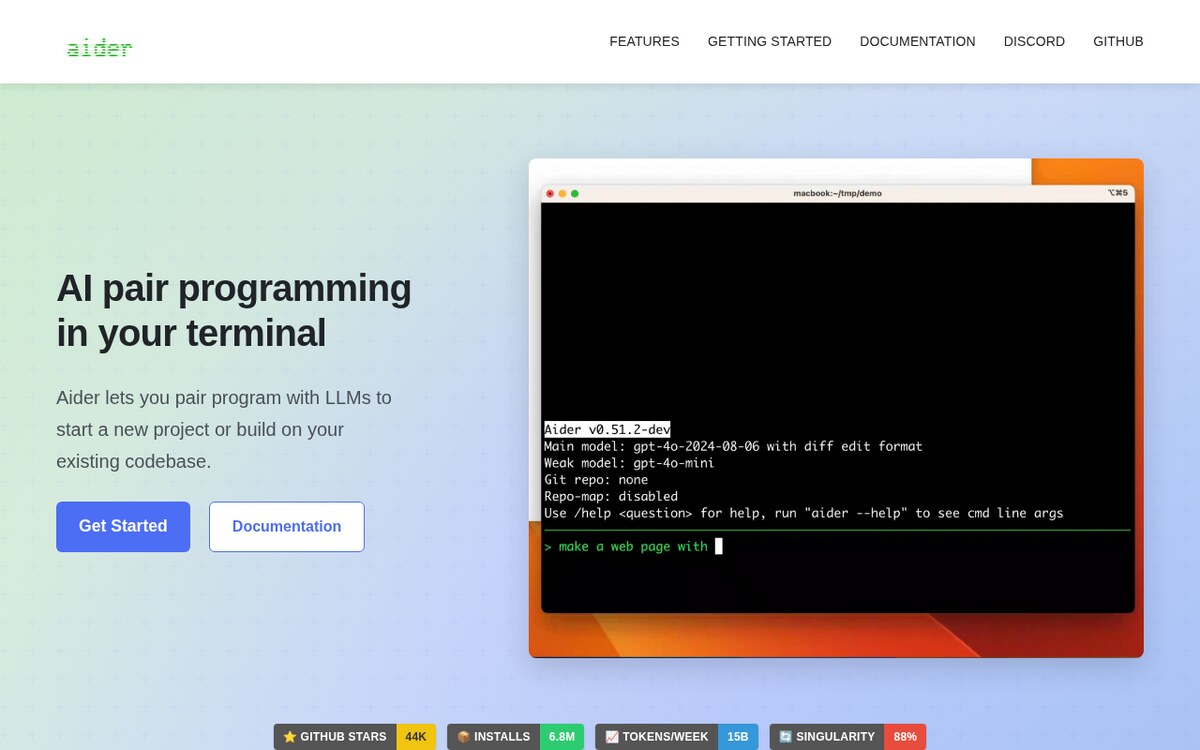
5. Aider – The Git-Integrated Pair Programming Powerhouse
Aider is a fast, terminal-based AI pair programming tool that works seamlessly with Git version control. Every time Aider completes an edit or refactoring task, it automatically stages the files and creates a clean, descriptive Git commit message.
- Best For: Developers who want fast, Git-backed pair programming with instant undo and branch isolation.
- Standout Capabilities:
- Automatic Git Commits: Every successful code change gets committed with a meaningful commit message.
- Repo-Wide Map Creation: Generates a condensed repository map using tree-sitter to optimize LLM context usage.
- Multi-Model Support: Works out of the box with Claude, GPT-4o, DeepSeek-R1, and local models via Ollama.
- Voice Coding Support: Dictate code instructions and feature requests hands-free via built-in audio transcription.
- Practical Workflow: Launch aider in your repository root, type /add src/ to map your source files, request your refactor, and watch Aider commit the working code.
- Pricing: Free and Open Source (Apache 2.0 license).
6. GitHub Copilot Workspace – The Task-Centric PR Planning Agent
GitHub Copilot Workspace reimagines the software lifecycle by turning GitHub issues into working code. Instead of starting inside an editor, Copilot Workspace initiates inside your browser or GitHub repository, drafting a full technical specification, implementation plan, and multi-file code diff.
- Best For: Open-source maintainers, engineering managers, and distributed teams managing features through GitHub Issues and PRs.
- Standout Capabilities:
- Issue-to-PR Pipeline: Converts a brief issue description into a complete technical design document and draft pull request.
- Editable Specification Plans: Allows developers to tweak and approve intermediate execution steps before code generation begins.
- Integrated Cloud Workspace: Runs a temporary cloud container to build and test code changes directly in the browser.
- Native GitHub Ecosystem: Direct integration with GitHub Actions, branch protection rules, and code reviews.
- Practical Workflow: Click “Open in Workspace” on any GitHub Issue, refine the generated spec, inspect the file diffs, and click “Create Pull Request.”
- Pricing: Included with GitHub Copilot Business and Enterprise subscriptions ($19–$39/user/month).
7. Continue.dev – The Modular Open-Source Assistant for Custom Stacks
Continue.dev is a flexible, open-source AI code assistant extension for VS Code and JetBrains IDEs. It gives software teams complete control over model selection, custom documentation indexing, and private self-hosted embeddings.
- Best For: Enterprise security teams, privacy-conscious developers, and JetBrains IDE users (IntelliJ, PyCharm, WebStorm).
- Standout Capabilities:
- Local & Private LLM Support: Pairs with Ollama, LM Studio, or vLLM to run 100% offline with zero external data transmission.
- Custom Docs Indexing: Type @docs to query internal API references, private wikis, or external library manuals.
- Fine-Grained Prompt Customization: Customize slash commands (/test, /comment, /edit) to match team guidelines.
- JetBrains & VS Code Parity: Delivers identical features across both major editor ecosystems.
- Practical Workflow: Configure config.json with your local or cloud endpoints, index your project documentation, and use inline @codebase prompts to refactor components.
- Pricing: Free and Open Source (Apache 2.0 license).
4. 5-Step Implementation Pipeline: Setting Up an Agentic Coding Workflow in 15 Minutes
Follow this practical five-step workflow to configure an autonomous agentic development environment on your machine:
- Select and Install Your Core Tool: Download Cursor or Windsurf for a dedicated IDE experience, or install Cline / Continue.dev inside your existing VS Code or JetBrains environment.
- Configure Project Rules (.cursorrules): Create a configuration file in your project root to specify your stack, preferred libraries, and styling standards:
# Project Architecture Rules
– Framework: Next.js 15 (App Router), TypeScript, Tailwind CSS
– Database: PostgreSQL with Drizzle ORM
– State Management: TanStack Query (React Query)
– Code Style: Strict TypeScript, no ‘any’, functional components with named exports
– Testing: Vitest for unit tests; always run ‘npm test’ before finalizing changes - Index Your Repository: Open your project folder and allow the tool to build its semantic vector index. Ensure .gitignore properly excludes node_modules, build artifacts, and virtual environments.
- Issue Structured Feature Prompts: Frame prompts with clear inputs, expected outputs, and constraints:“Implement an idempotency middleware for our payment webhooks. Store idempotency keys in Redis with a 24-hour TTL. Add unit tests in /tests/idempotency.test.ts and run tests to verify.”
- Review Diffs and Validate Execution: Review the generated multi-file diffs in your split editor, inspect the terminal test run output, and commit the verified code to your Git branch.
5. Recommended Guides & Developer Resources
Expand your modern software engineering stack with these related technical breakdowns on ISMARTANJI CREATIONS:
- 7 Breakthrough AI Vector Databases for Developers in 2026 – Build high-speed semantic retrieval and long-term memory for AI agents.
- 7 Breakthrough Autonomous AI Agent Frameworks in 2026 – Construct multi-agent software pipelines with tool-calling capabilities.
- 7 Breakthrough Local AI Models for Laptops in 2026 – Run private, open-weight coding and reasoning models completely offline.
- 7 Breakthrough AI Web Scraping Tools in 2026 – Extract clean, structured markdown data to train and ground your AI workflows.
6. Frequently Asked Questions
What is the main difference between Cursor and GitHub Copilot?
GitHub Copilot originally focused on single-line autocomplete suggestions. Cursor was built from the ground up as an agentic IDE that indexes your entire repository, writes multi-file diffs simultaneously, and executes terminal commands to self-correct compiler errors.
Can I run AI coding assistants completely offline for private codebases?
Yes. Extensions like Continue.dev, Cline, and Aider allow you to connect directly to local inference engines (such as Ollama or LM Studio) running open-weight models like DeepSeek-R1 or Qwen 2.5 Coder. All code processing remains strictly on your local machine with zero external network transmission.
How do project rule files like .cursorrules improve code generation?
Rule files provide persistent context to the AI model on every request. By defining your project’s framework versions, testing requirements, directory structures, and naming conventions, the assistant generates code that adheres to your team’s specific architectural standards without repetitive prompting.
Will AI coding assistants replace software engineers?
No. Modern coding assistants automate repetitive boilerplate, accelerate multi-file refactoring, and speed up debugging. However, human software engineers remain essential for system architecture design, security auditing, business logic formulation, and high-level decision-making.
7. Summary & Action Plan
The software engineering field has entered the era of agentic programming. By integrating full-codebase indexing, autonomous tool calling, and multi-file diff generation into your daily development routine, you eliminate hours of manual busywork and ship production features with higher confidence.
Your 5-Step Action Checklist:
- [ ] Install an agentic code editor (Cursor, Windsurf) or extension (Cline, Continue.dev).
- [ ] Add a .cursorrules or project prompt file to your primary repository.
- [ ] Allow the editor to complete its semantic codebase indexing.
- [ ] Practice prompting with multi-file feature requests and automated test execution.
- [ ] Set up automated Git commit workflows with Aider or Claude Code for fast iteration.
Which AI coding assistant has made the biggest impact on your development workflow? Share your favorite setup and tips in the comments below, and visit ISMARTANJI CREATIONS for daily in-depth guides on AI innovations, developer tools, and automation workflows!
Sources & Further Reading
- GitHub Copilot documentation
- Anthropic: Claude Code documentation
- Chen et al., Evaluating Large Language Models Trained on Code (arXiv)
Written & Verified by Sampath Anji
Sampath Anji is a technology researcher, systems developer, and digital creator based in Telangana, India. He specializes in on-device AI architectures, autonomous agent workflows, high-throughput inference engines, and digital media production. Every tutorial on ISMARTANJI CREATIONS is grounded in code reproducibility, verified documentation, and transparent test environments. Read our full testing methodology on our About Us page, or submit feedback and code updates via our Contact Desk.